Hardware Used
Cluster Nodes — 5x Lenovo ThinkPad + 1x MacBook Pro
The five ThinkPad nodes run on Lenovo ThinkPad laptops with (near-)identical specs; the sixth node, swift-mac, is a MacBook Pro 2012 (see its section below):
✔ CPU: Intel Core i7 (8 cores)
✔ RAM: 16 GB (15.9 GiB usable)
✔ Storage: 512.1 GB SSD
✔ Network: 1 Gbps Ethernet (Intel I219-V)
✔ OS: Ubuntu 24.04 LTS "Noble Numbat"
Node Details
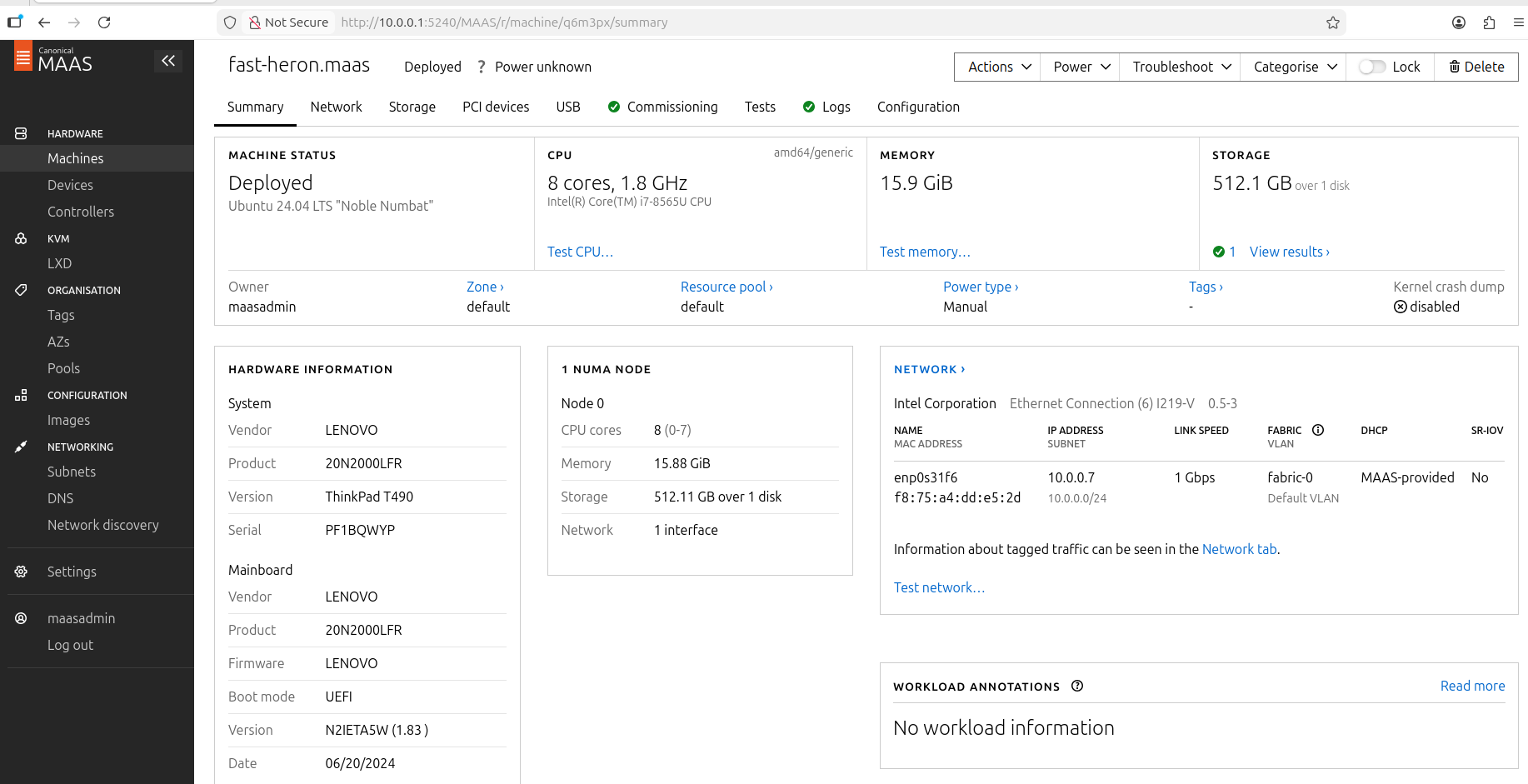
fast-heron — 10.0.0.7
| Field | Value |
|---|---|
| Model | Lenovo ThinkPad T490 (20N2000LFR) |
| CPU | Intel Core i7-8565U, 8 cores |
| RAM | 15.9 GiB |
| Storage | 512.1 GB |
| NIC | Intel I219-V 0.5-3 |
| Serial | PF1BQWYP |
| Firmware | UEFI (N2IETA5W 1.83) |
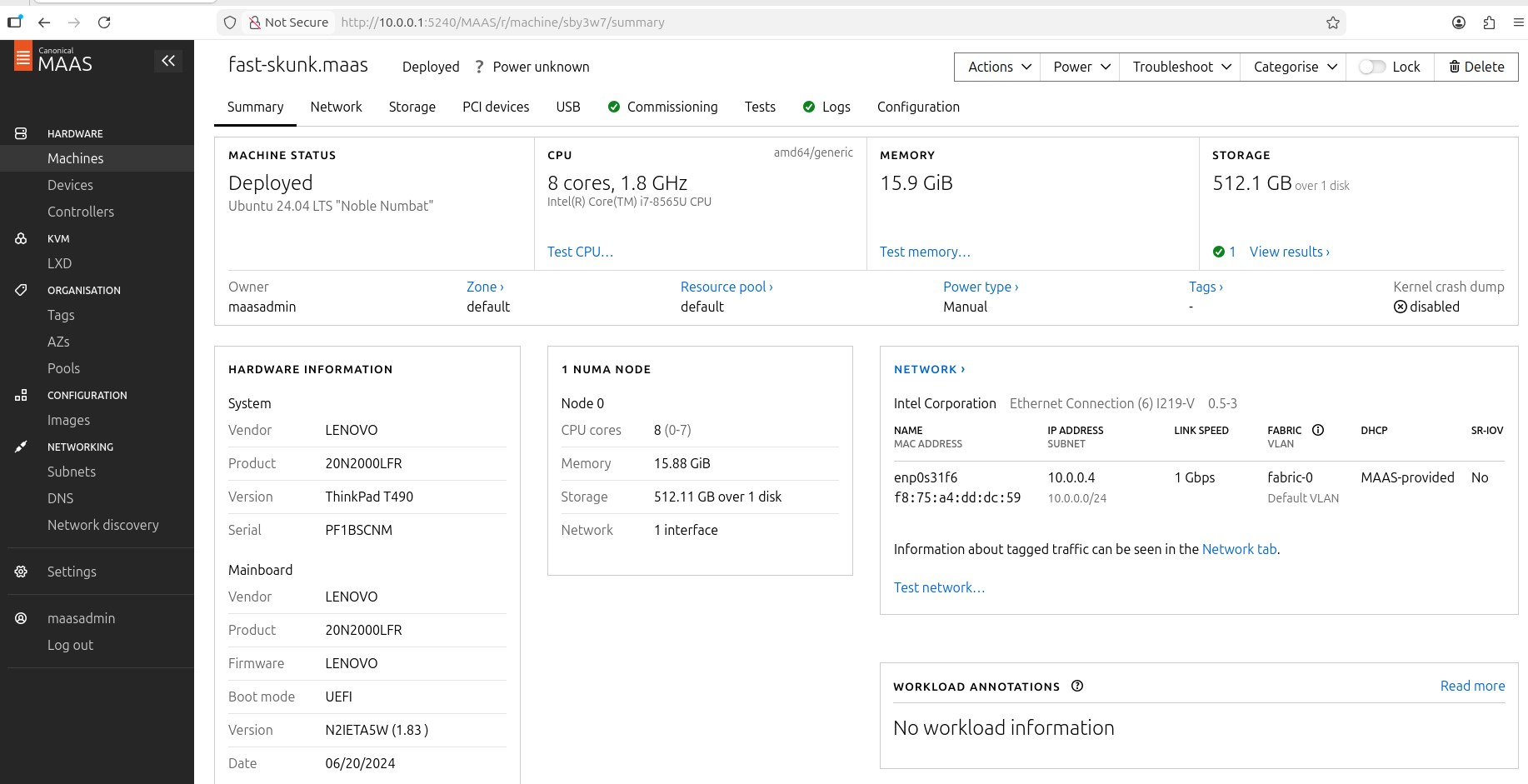
fast-skunk — 10.0.0.4
| Field | Value |
|---|---|
| Model | Lenovo ThinkPad T490 (20N2000LFR) |
| CPU | Intel Core i7-8565U, 8 cores |
| RAM | 15.9 GiB |
| Storage | 512.1 GB |
| NIC | Intel I219-V 0.5-3 |
| Serial | PF1BSCNM |
| Firmware | UEFI (N2IETA5W 1.83) |
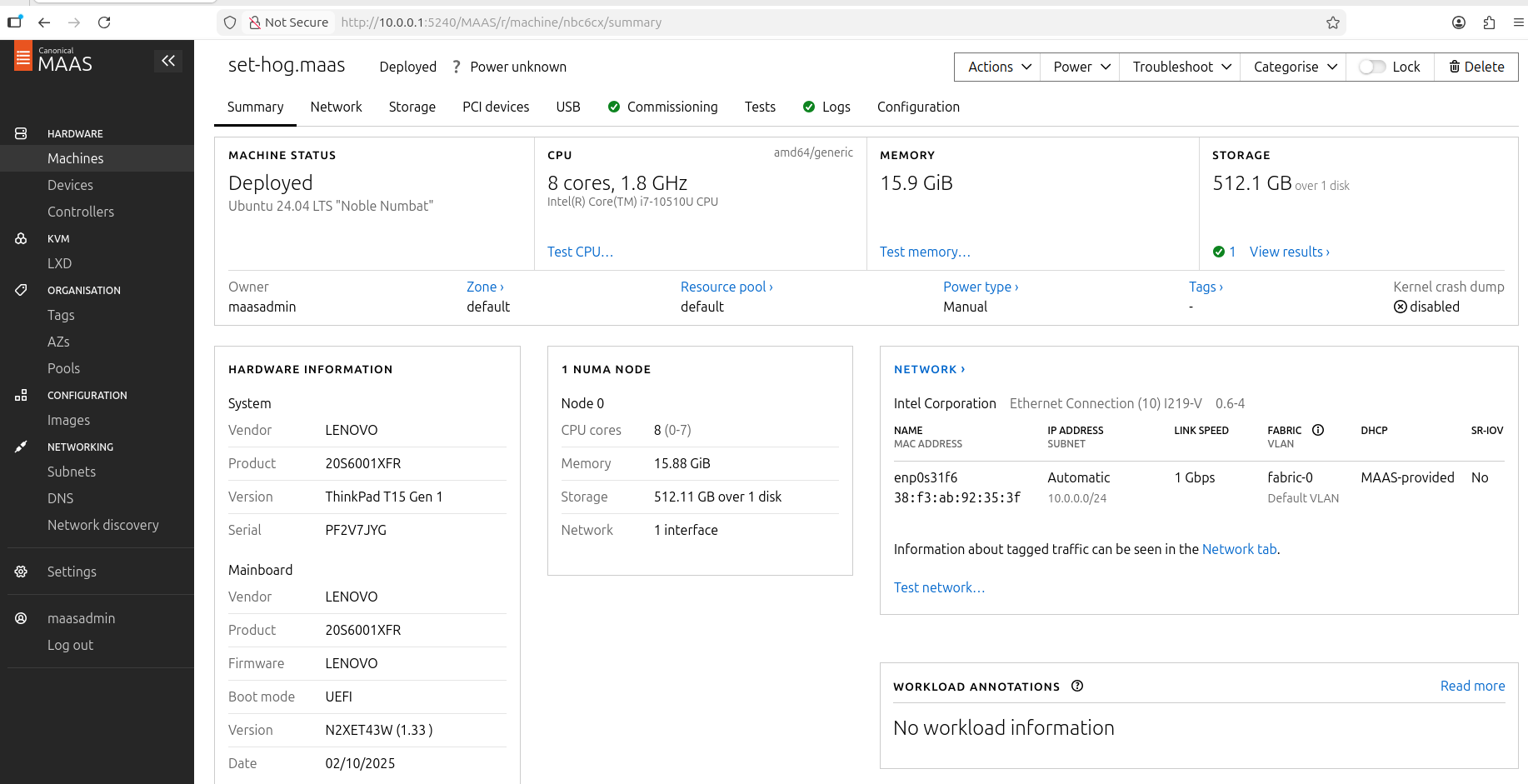
set-hog — 10.0.0.2
| Field | Value |
|---|---|
| Model | Lenovo ThinkPad T15 Gen 1 (20S6001XFR) |
| CPU | Intel Core i7-10510U, 8 cores |
| RAM | 15.9 GiB |
| Storage | 512.1 GB |
| NIC | Intel I219-V 0.6-4 |
| Serial | PF2V7JYG |
| Firmware | UEFI (N2XET43W 1.33) |
star-kitten — 10.0.0.8
| Field | Value |
|---|---|
| Model | Lenovo ThinkPad T490 |
| CPU | Intel Core i7-8565U, 8 cores |
| RAM | 15.9 GiB |
| Storage | 512.1 GB |
| NIC | Intel I219-V (enp0s31f6) |
| MAAS system_id | dr3cnm |
| Added | 2026-07-04 |
loving-gannet — 10.0.0.9
| Field | Value |
|---|---|
| Model | Lenovo ThinkPad (T490-class, 8-core i7) — confirm exact model/serial on-box |
| CPU | Intel Core i7, 8 cores |
| RAM | ~15.6 GiB |
| Storage | ~512 GB SSD |
| NIC | Intel I219-V |
| Added | 2026-09 (5th ThinkPad; brings the cluster to 6 nodes) |
:::note Fifth ThinkPad worker
loving-gannet was added to grow worker capacity (one of the "+2 ThinkPads" from roadmap #239). It is a permanent k3s worker. Model/serial/firmware to be filled in from the physical machine.
:::
swift-mac — 10.0.0.10
| Field | Value |
|---|---|
| Model | Apple MacBook Pro 13-inch Mid 2012 |
| CPU | Intel Core i5-3210M (Ivy Bridge), 2 cores / 4 threads |
| RAM | 8 GiB DDR3 1600 MHz |
| Storage | 480 GB SSD |
| NIC | Broadcom BCM57765 (built-in RJ45, enp1s0f0) |
| Serial | C02JL20WDTY4 |
| OS | Ubuntu 22.04.5 LTS (manual USB install — Apple EFI incompatible with MAAS PXE) |
| Added | 2026-07-12 |
:::note Non-MAAS install Apple hardware uses a proprietary NetBoot protocol incompatible with standard PXE/MAAS. swift-mac was provisioned via USB installer. See Adding a Non-MAAS Node for the full procedure. :::
Total Cluster Capacity
:::info Current totals (6 nodes)
Since adding loving-gannet (2026-09), the cluster is 6 nodes → 44 cores / ~84 GiB RAM (5× 8-core ThinkPad + 1× 4-core MacBook Pro), on k3s v1.36.3+k3s1 (1 control-plane + 5 workers). The table below is the original 5-node snapshot (2026-07-12) — add one 8-core / ~15.6 GiB ThinkPad row for the current picture.
:::
Figures from kubectl node capacity (5-node snapshot, 2026-07-12):
| Resource | set-hog | fast-heron | fast-skunk | star-kitten | swift-mac | Total |
|---|---|---|---|---|---|---|
| CPU cores | 8 | 8 | 8 | 8 | 4 | 36 |
| RAM (usable) | 15.6 GiB | 15.6 GiB | 15.6 GiB | 15.6 GiB | 7.8 GiB | ~70 GiB |
| Disk (usable) | 468 GB | 468 GB | 468 GB | 468 GB | 437 GB | ~2.3 TB |
| Max pods | 110 | 110 | 110 | 110 | 110 | 550 |
Live Resource Utilization
Measured 2026-07-12 with 162 running pods across 57 ArgoCD apps:
| Node | RAM used / total | RAM free | Disk used / total | Disk free |
|---|---|---|---|---|
| set-hog | 8.4 GiB / 15 GiB | 6.9 GiB | 137 GB / 468 GB | 308 GB (69%) |
| fast-heron | 6.5 GiB / 15 GiB | 8.8 GiB | 150 GB / 468 GB | 295 GB (66%) |
| fast-skunk | 4.5 GiB / 15 GiB | 10 GiB | 91 GB / 468 GB | 354 GB (79%) |
| star-kitten | 6.3 GiB / 15 GiB | 9.0 GiB | 143 GB / 468 GB | 302 GB (67%) |
| swift-mac | 1.2 GiB / 7.7 GiB | 6.1 GiB | 16 GB / 437 GB | 403 GB (96%) |
| Cluster total | ~27 GiB / ~68 GiB | ~41 GiB free | ~537 GB / ~2.3 TB | ~1.66 TB free |
CPU allocation (requests/limits across all pods):
| Node | CPU requested | CPU limit | Cores |
|---|---|---|---|
| fast-heron | 4.7 / 8 (59%) | 15.0 (187% — overcommit) | 8 |
| fast-skunk | 3.4 / 8 (43%) | 17.0 (211% — overcommit) | 8 |
| set-hog | 3.7 / 8 (46%) | 15.1 (188% — overcommit) | 8 |
| star-kitten | 4.2 / 8 (51%) | 13.7 (171% — overcommit) | 8 |
| swift-mac | 0.9 / 4 (23%) | 3.7 (91%) | 4 |
CPU limits exceed physical cores intentionally — this is standard Kubernetes overcommit. Limits are only enforced under CPU pressure; actual utilization stays well below capacity.
Equivalent Cloud Cost Comparison
The cluster resource profile (36 vCPU / ~68 GiB RAM) averages ~1.9 GiB RAM per vCPU — this places it in the Compute-Optimized tier, not General Purpose. Prices below use On-Demand (Pay-As-You-Go) rates in US regions over a 730-hour month. These are the absolute ceiling; committed-use discounts are discussed below.
AWS — 9× c6i.xlarge
9 instances gives exactly 36 vCPUs and 72 GiB RAM (c6i compute-optimized family, 2 GiB/vCPU ratio).
| Resource | Detail | Unit Cost | Monthly Cost |
|---|---|---|---|
| Compute | 9 × c6i.xlarge (36 vCPUs, 72 GiB RAM) | $0.17 / hr each | $1,116.90 |
| Storage | GP3 SSD (2,300 GB) | $0.08 / GB-mo | $184.00 |
| Total AWS | ~$1,300.90 / mo |
Azure — F32s_v2 + F4s_v2
One Standard_F32s_v2 (32 vCPU, 64 GiB) + one Standard_F4s_v2 (4 vCPU, 8 GiB) = exactly 36 vCPU, 72 GiB.
| Resource | Detail | Unit Cost | Monthly Cost |
|---|---|---|---|
| Compute | F32s_v2 + F4s_v2 (36 vCPUs, 72 GiB RAM) | $1.353 + $0.354 / hr | $1,246.11 |
| Storage | Premium SSD v2 (2,300 GB) | ~$0.08 / GB-mo | $184.00 |
| Total Azure | ~$1,430.11 / mo |
GCP — N2 Custom (36 vCPU, 68 GiB)
GCP Custom Machine Types allow exact sizing — no over-provisioning required.
| Resource | Detail | Unit Cost | Monthly Cost |
|---|---|---|---|
| Compute | N2 Custom (36 vCPUs, 68 GiB RAM) | Per vCPU + GB pricing | ~$1,150.00 |
| Storage | Balanced Persistent Disk (2,300 GB) | $0.10 / GB-mo | $230.00 |
| Total GCP | ~$1,380.00 / mo |
Bare-Metal (this setup)
| Resource | Value | Monthly Cost |
|---|---|---|
| Hardware (5× ThinkPad + MacBook Pro 2012) | 44 cores / ~84 GiB / ~2.8 TB | ~$0 (already owned) |
| Electricity (~270 W total, 24/7) | 6× laptops at idle/load | ~$25–$40 / mo |
| Total bare-metal | ~$25–$40 / mo |
:::info Sizing note
The GCP/AWS/Azure quotes above reflect the original 5-node (36-core / 68 GiB) research. Since adding loving-gannet the cluster is 6 nodes / 44 cores / ~84 GiB, so the equivalent cloud bill — and therefore the spend avoided — scales up proportionally.
:::
:::tip Cost advantage
At the current 6-node / 44-core scale, running bare-metal avoids roughly ~$16,000–$19,000 / year versus the cheapest equivalent always-on cloud option (~11× AWS c6i.xlarge for 44 vCPU-equivalent) — with full hardware control and zero egress fees.
:::
How to cut cloud costs by 30–70 %
The On-Demand prices above are the absolute ceiling. If this cluster ran in the cloud continuously, several strategies would apply:
| Strategy | Saving | Notes |
|---|---|---|
| 1-year commitment (AWS Savings Plans / Azure Reserved / GCP CUD) | 30–55 % off compute | Locks in price; break-even in ~6 months |
| 3-year commitment | up to 60–65 % off compute | Best for stable baseline workloads |
| GCP Sustained Use Discount | up to 20 % automatic | Applied by GCP with no upfront contract when instances run >25 % of the month |
| Right-size to actual usage | variable | Current utilisation: 17 / 36 cores, 537 GB / 2.3 TB — a smaller cluster would cut the base bill by ~40 % |
| Spot / Preemptible for batch | 60–90 % off | Only for fault-tolerant workloads (AI inference jobs, RAG pipelines) |
Even with a 1-year commitment at 40 % off, the cheapest cloud option (AWS) would cost ~$780 / mo — still 22× more expensive than running the same workload bare-metal.